
Organisation management
Manage the company, not just the contact.
When you sell to a business, the relationship is with the business — several people, several conversations, sometimes several deals at once. bizzMate makes the organisation a real record so that whole picture holds together.
No credit card required · Set up in minutes · AUD pricing
Why it matters
What organisation management is for
A CRM that treats the company as a text field on a contact falls apart the moment a second person at that company gets involved, or the first one leaves.
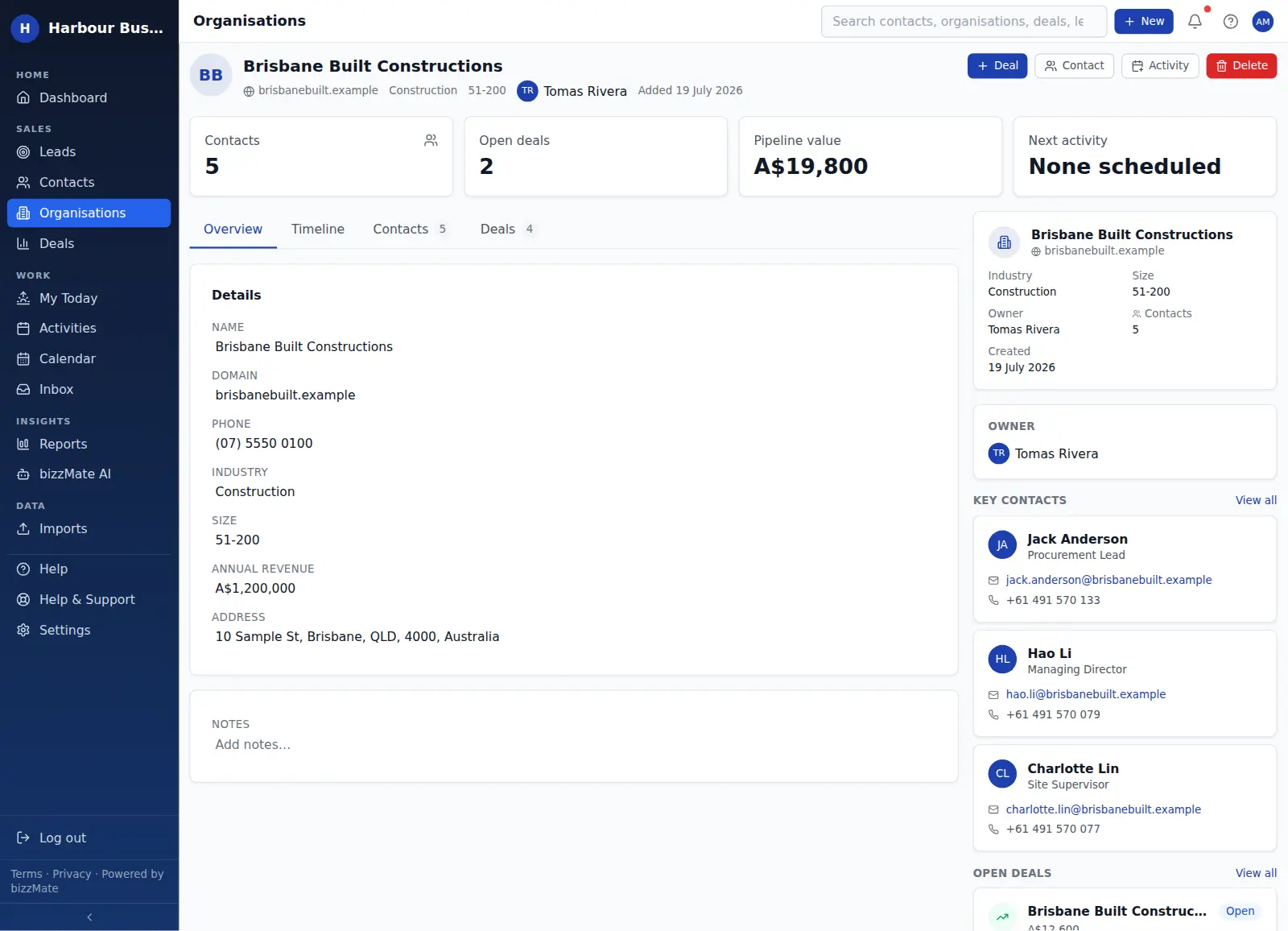
In bizzMate an organisation is a first-class record with its own detail, its own people, its own opportunities and its own timeline — so an account manager can read the whole account in one place.
At a glance
- Industry, size band, domain, phone and address
- Every contact who works there, in one list
- Every open and closed deal against the account
- Activity logged across everyone at the company
- An owner for the account as a whole
Capabilities
What it actually does
Every item below is a shipped part of bizzMate today — not a roadmap entry.
The account's people in one panel
Open an organisation and you see every contact linked to it, with their role, so you know who the decision maker is and who you have actually been speaking to.
Every opportunity against the account
Deals are linked to both the organisation and a primary contact, so you can see the full commercial picture for a company at a glance — including what you have already won and lost.
An account-level timeline
The organisation timeline aggregates the activity logged across the account, so you get the relationship history even when it happened with a colleague or a person who has since moved on.
Filter and segment your accounts
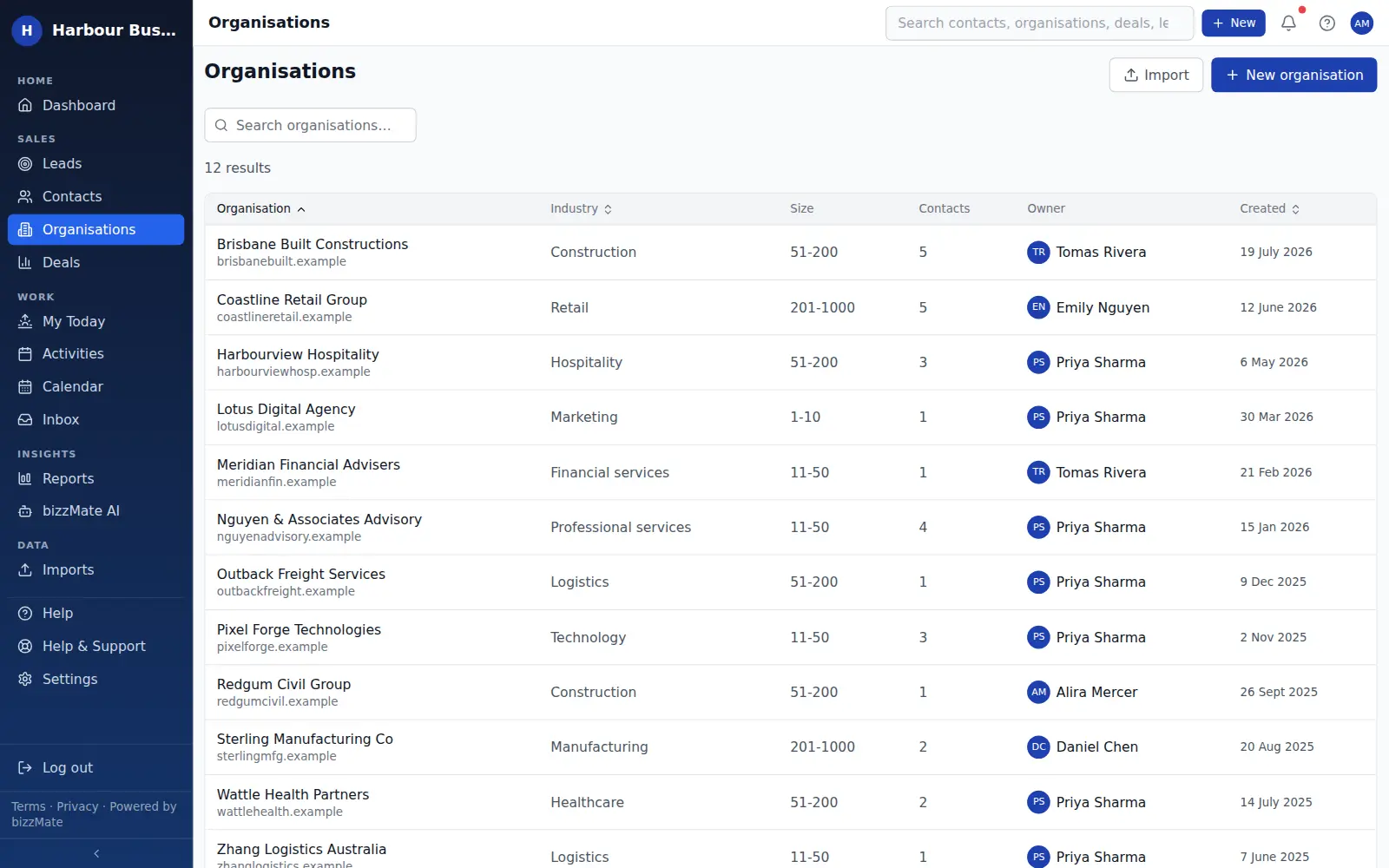
The organisations list can be filtered and sorted by industry, size and owner, so you can work a segment rather than a flat list.
Duplicate detection on create
bizzMate checks for an existing organisation with a matching name or domain before creating a second one, which is usually where account data starts to fragment.
In the product
What this looks like day to day
How it works
How it fits a working day
Step 1: Create the account once
Add the organisation with its industry, size and domain — or let it be created as you add the first contact from that company.
Step 2: Attach the people and the opportunities
Link contacts to the organisation as you meet them, and raise deals against the account with a primary contact so it is clear who is driving it.
Step 3: Read the account before the meeting
Open the organisation, scan the timeline and the open deals, and walk into the conversation knowing what happened last time.
Frequently asked questions
- Do I have to create an organisation for every contact?
- No. A contact can exist without an organisation — useful for sole traders and individual customers. You can link them to a company later without losing any history.
- Can one organisation have several open deals?
- Yes. There is no limit on how many deals can sit against one account, and the organisation record shows them together so you can see total exposure to that customer.
- Is there an organisation limit on my plan?
- Organisations are unlimited on every bizzMate plan. Contacts and deals have per-plan limits, which are listed on the pricing page.
Explore related capabilities
- Contact managementPeople, roles, ownership and when you last actually spoke.
- Deal managementValue, stage, owner, close date — and an honest outcome.
- Customer timelineCalls, notes, files and synced email in one chronological thread.
- ReportingWon revenue, weighted pipeline, win/loss reasons and sales cycle.
Try organisation management on your own customers.
Start a free 15-day trial of bizzMate and set your workspace up in an afternoon. No credit card required.
No credit card required.